App Cert Enhancements

Redesigning the App Cert experience on DriveTime.com so a customer can see their personalized terms on every car.

DriveTime • 2022

Project Overview
Role

UX/UI Design

Team

1 UX manager, 1 product analyst, 1 UX designer, 1 content specialist, 1 graphic designer

Tools

Adobe XD, Adobe Illustrator, Miro, Zeplin

Challenge

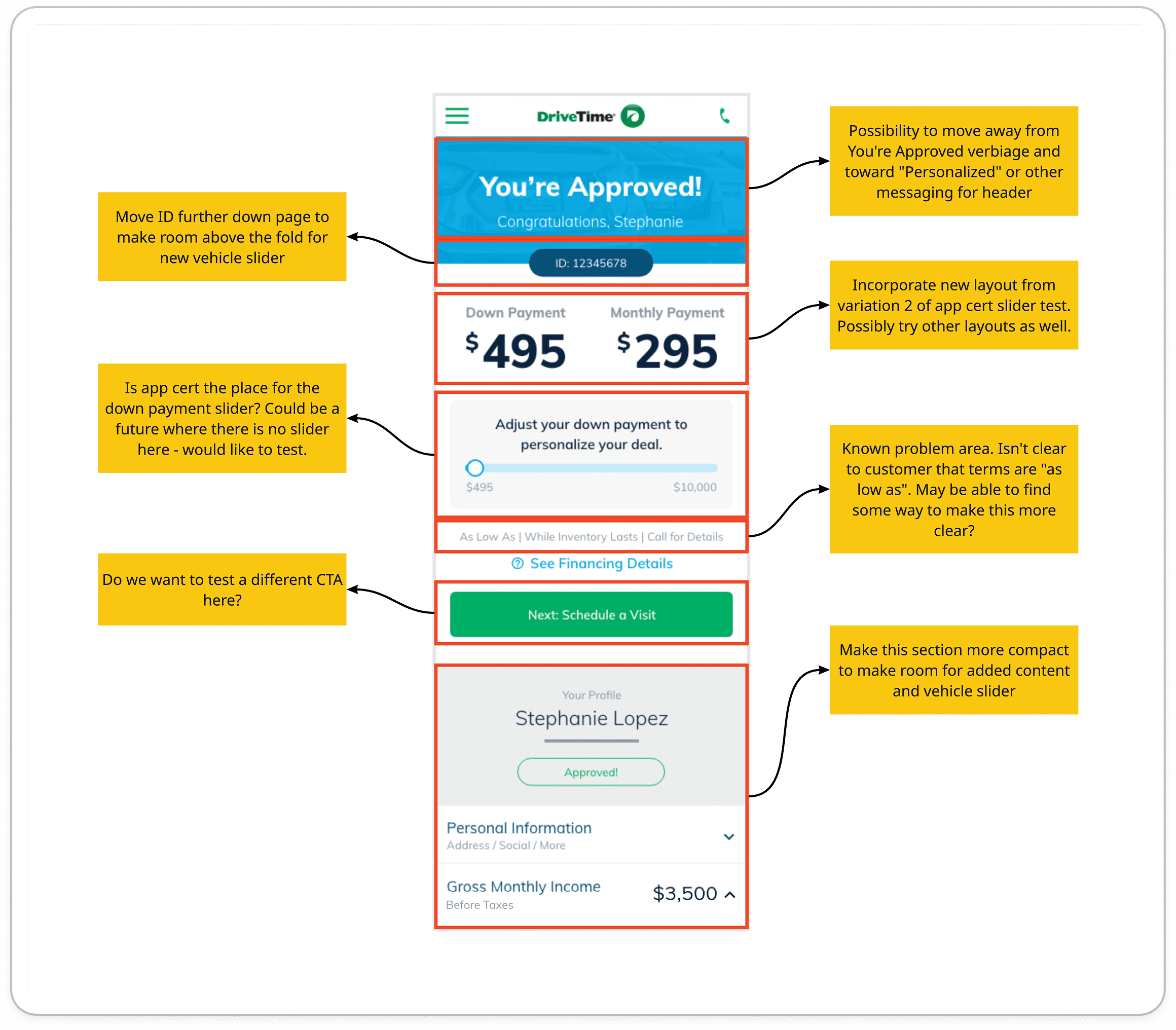
The Approval Certificate (App Cert) page is not consistent with the direction the Vehicle Search Results (VSR) page has taken, which is to display terms on every vehicle. This has created a gap in the customer’s online shopping experience.

Solution

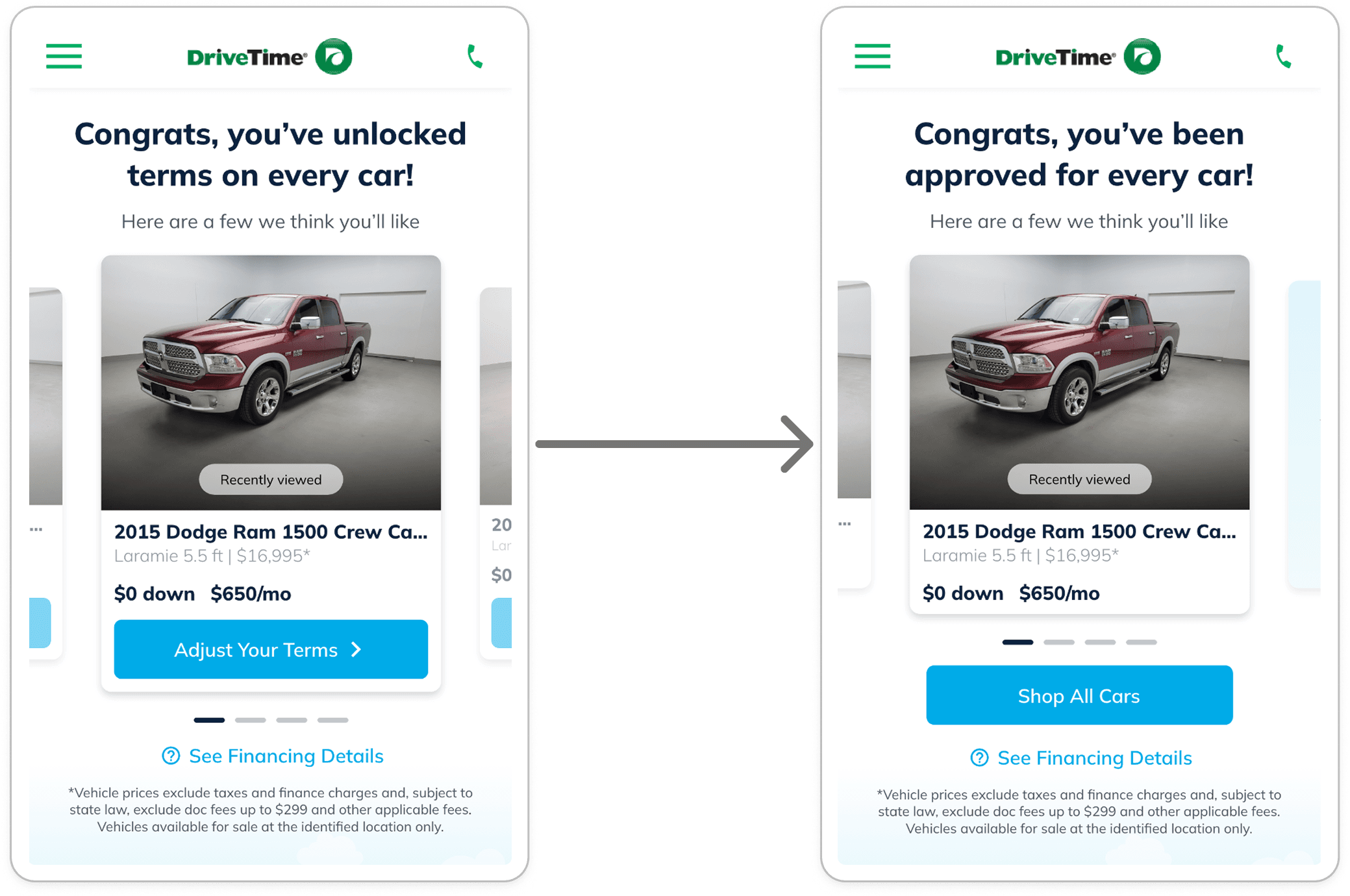
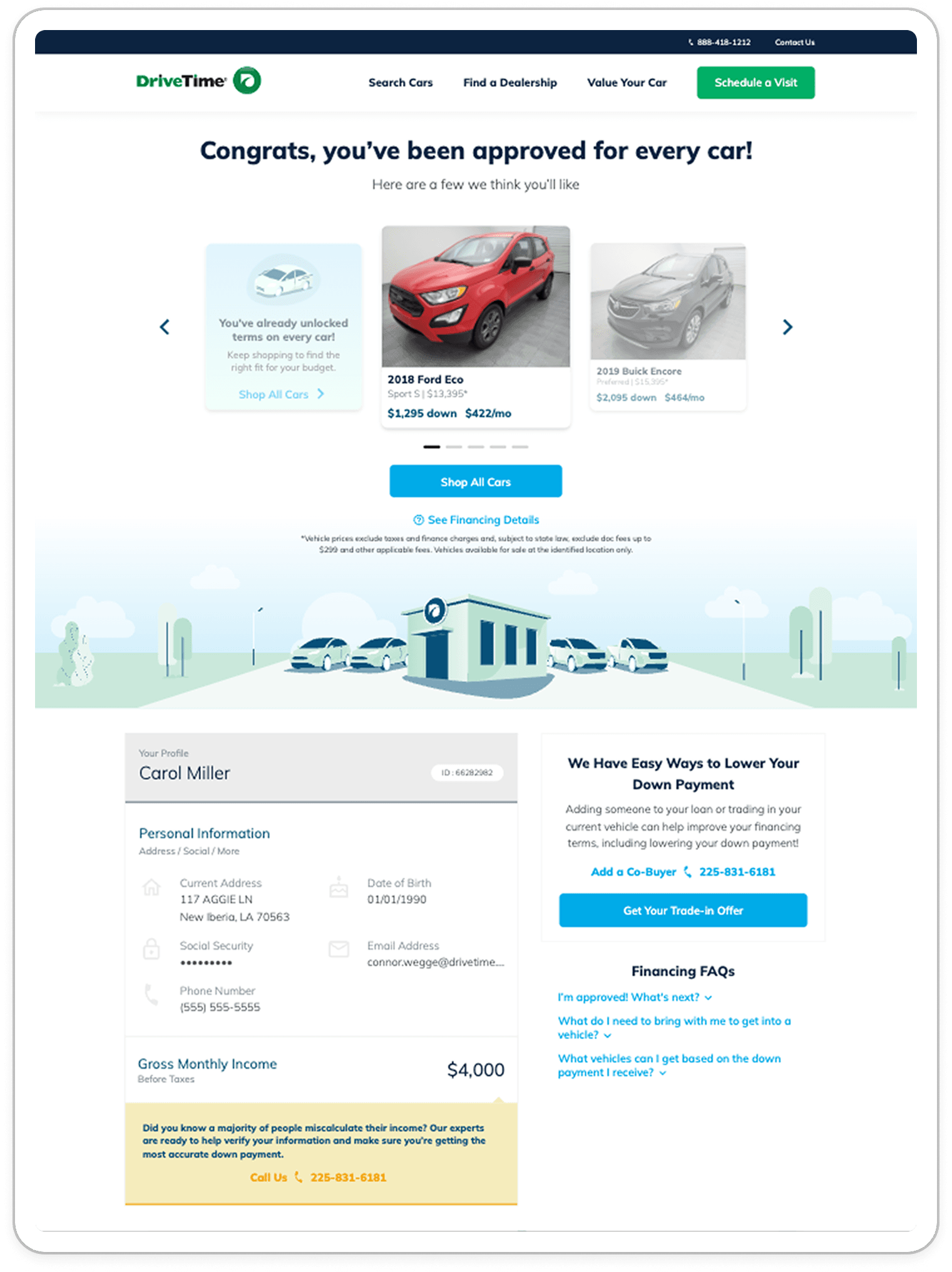
Redesign above the fold of the App Cert page to display a selection of cars with the user’s personalized terms.

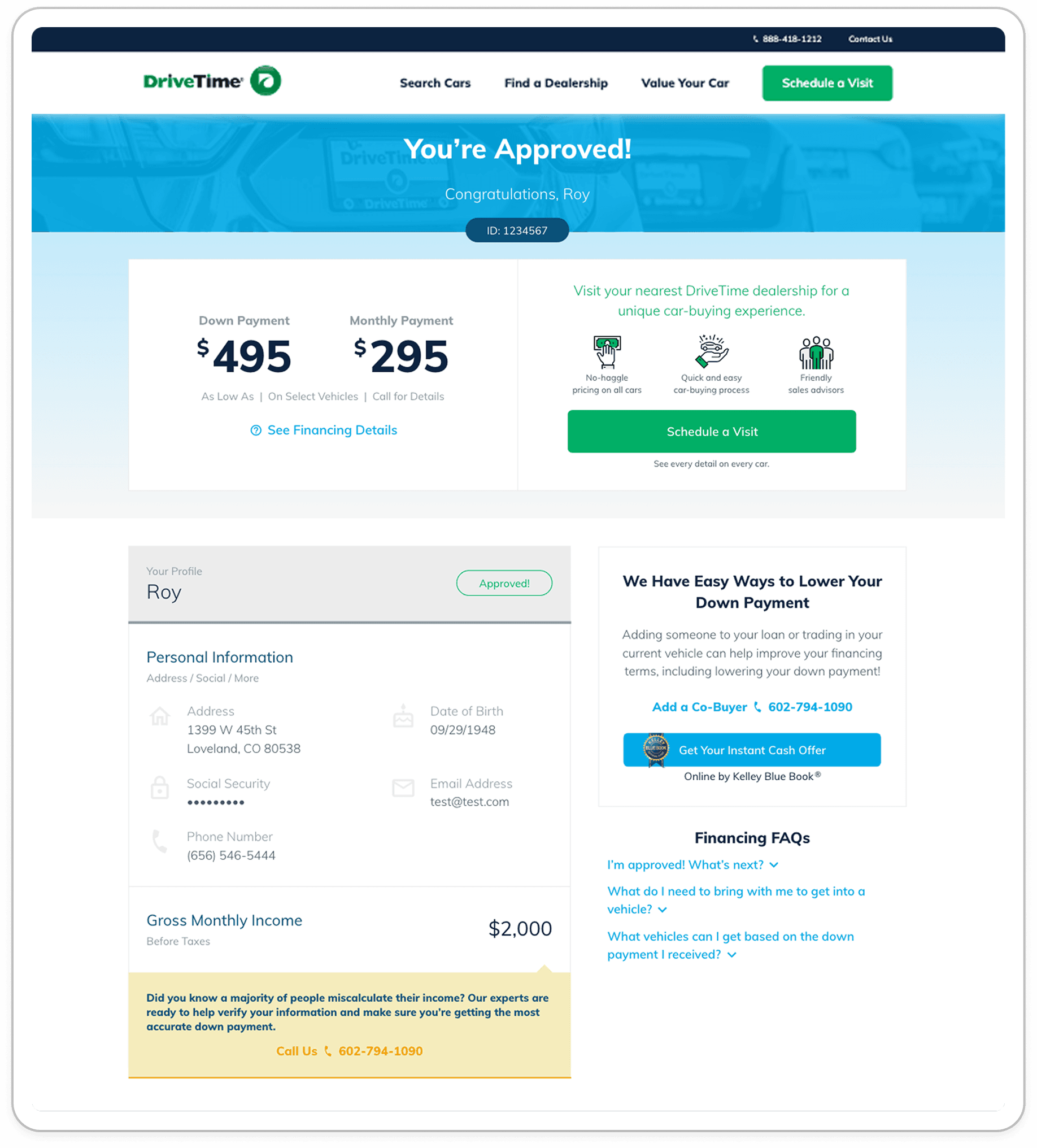
Before
After
Project Background

When I joined the DriveTime creative team, a major update had recently been introduced: adding personalized terms to the Vehicle Search Results (VSR) page. This “HyperDrive” experience allowed users to see their terms on every vehicle they browsed, moving the company closer to a fully online shopping and purchasing experience.

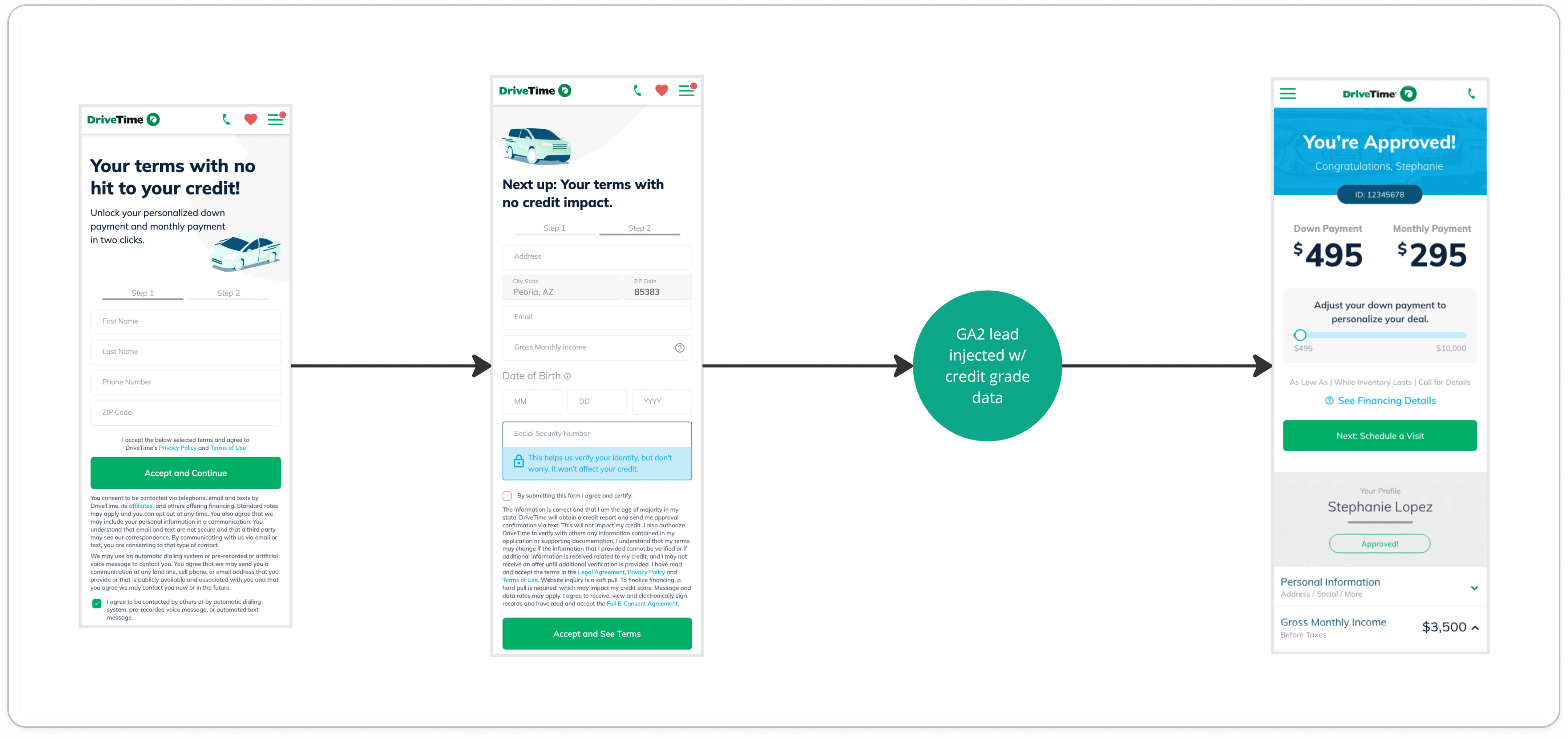
To access these terms, users first complete the Get Approved (GA) process. If approved, they land on the Approval Certificate (App Cert) page, where they are shown starting terms based on the lowest-priced vehicle available to them. At the time, these terms were presented as standalone numbers, without any vehicle context.

I was assigned the App Cert Enhancements project, with the goal of reimagining the experience to better align with the current design system and the HyperDrive experience on VSR. The objective was to create a more cohesive and engaging experience that encouraged users to continue shopping, ultimately increasing lead-to-application conversion.
Chapter I

Research

Understanding the project’s goals

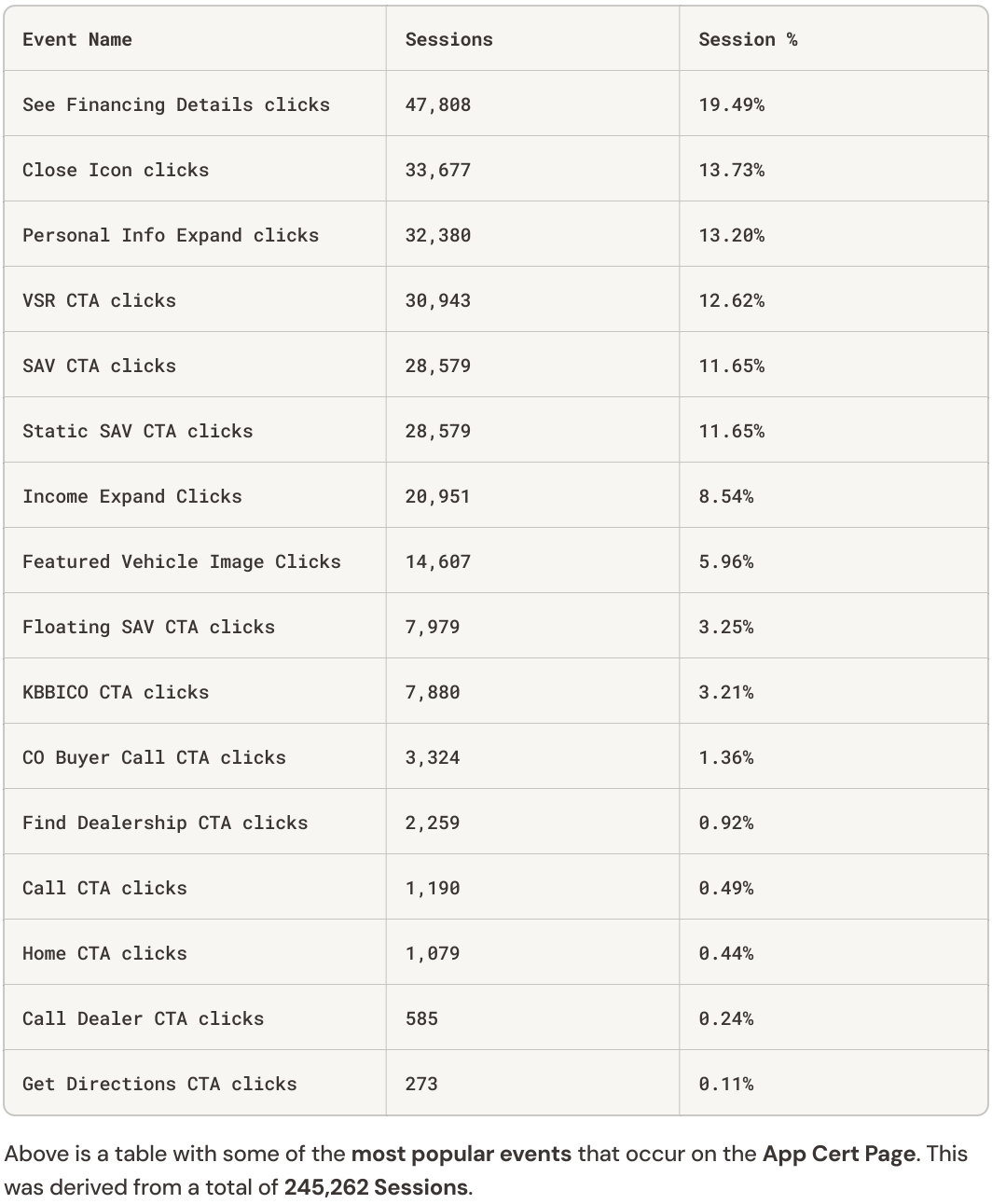
Being new to the DriveTime team, I took time to understand the company’s goals and brand. I reviewed the existing experience in production, explored previous App Cert iterations, and looked at performance data to identify user behavior and potential friction points.

Before moving into design, I also clarified the scope — what could be redesigned and what needed to remain. Once those constraints were clear, I felt confident moving forward.

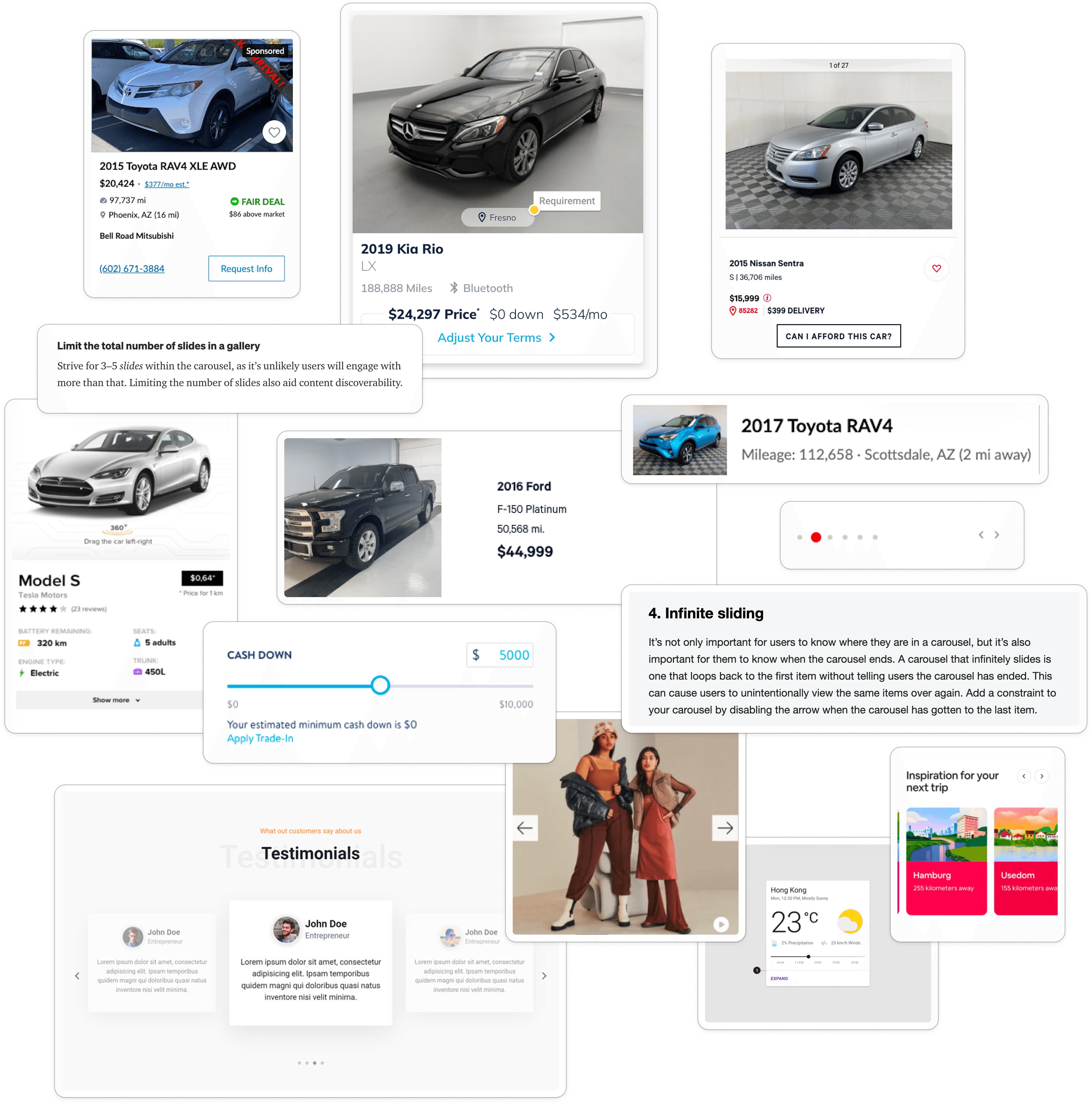
Best practices for card and carousel UX/UI

After understanding the overall objective, I reviewed competitor experiences and other interfaces that present dense information within a single card. I knew the App Cert vehicles would need to surface the same key details as vehicle cards, while still acting as a teaser for VSR. Defining a clear hierarchy — what users should see first and what could be secondary — was critical.

There was also discussion around replacing the customer’s starting terms with a carousel of vehicles, which would introduce a new component to the site. I explored carousel patterns and best practices to understand how this could work. Questions included whether the experience should be finite or infinite, how users would recognize the end, and whether navigation controls were necessary or if gestures alone would be intuitive.

While a carousel offered a more interactive approach, I focused on ensuring it would still support user needs first and not introduce unnecessary complexity.

Chapter II

Riff

Mobile-First Wireframing

Because DriveTime sees more traffic on mobile than tablet or desktop, I began this phase by designing mid-fidelity wireframes for mobile.

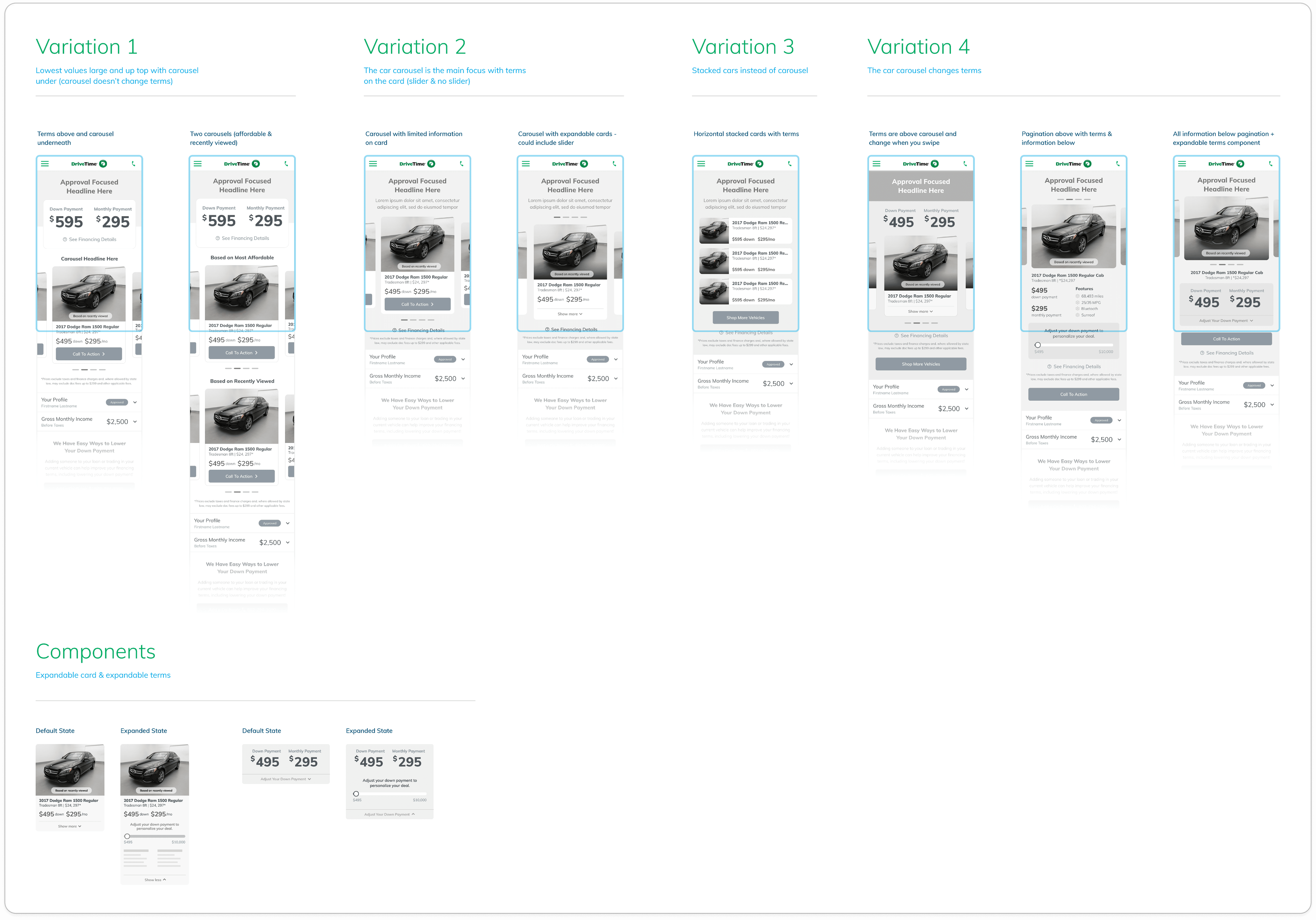
I explored different ways to combine or separate key elements, including:
  1. The user’s starting terms

  2. The down payment slider

  3. A car carousel vs. stacked vehicle cards

I came up with four different categories:

Variation 1: The user’s starting terms are displayed above the page with the carousel underneath
Variation 2: The carousel is the center of attention (one of these cars represents the user’s starting terms)
Variation 3: The cars are stacked instead of in a carousel (one of these cars represents the user’s starting terms)
Variation 4: Swiping through the car carousel dynamically changes the terms on the page

After reviewing the initial concepts with my manager and senior UX designer, we narrowed them down and presented them to Product and Leadership.

With approval, I moved into high-fidelity. Variation 2 and Variation 3 were selected as the final options for experimentation.

"You're Approved" → "You've Unlocked Your Terms"

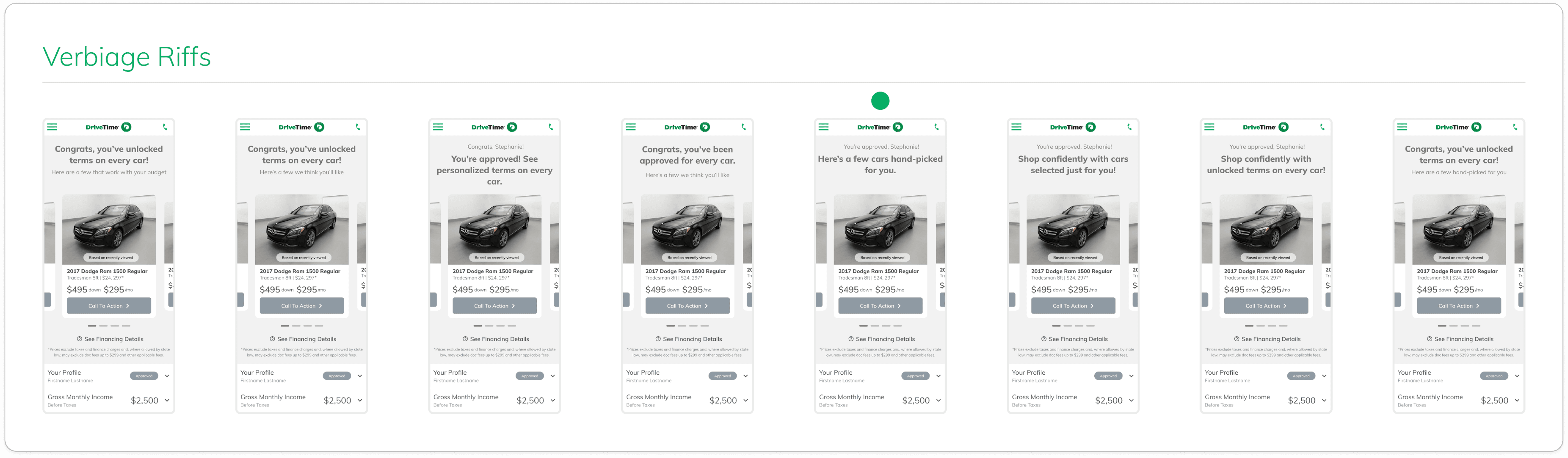
With the wireframes selected, I moved into refining the messaging for these new concepts. I partnered with our content specialist to explore ways to make the experience more engaging while staying concise.

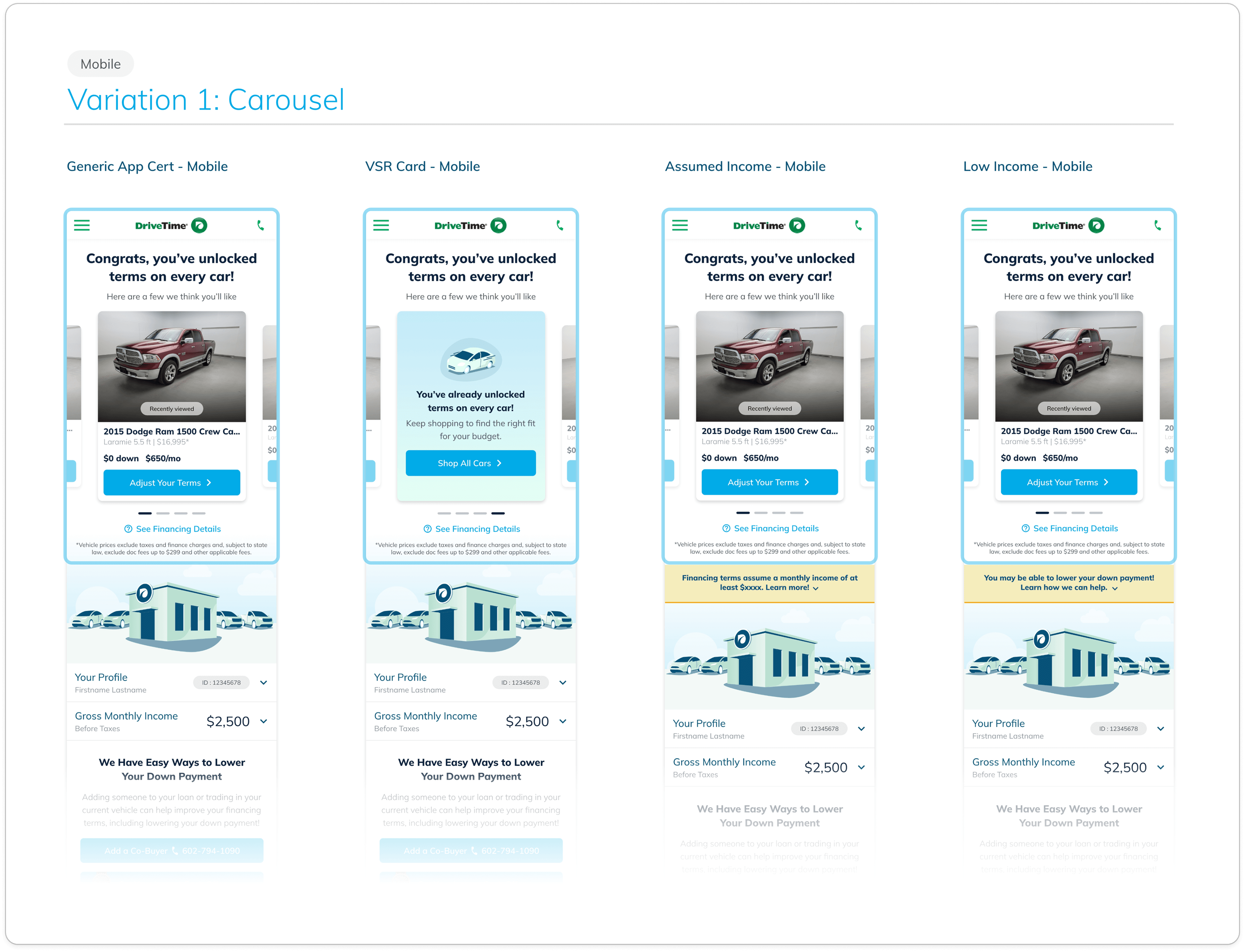
Instead of a generic approval message (“You’re approved!”), we shifted the focus to what the user gained from the action: “Congrats, you’ve unlocked terms on every car!”

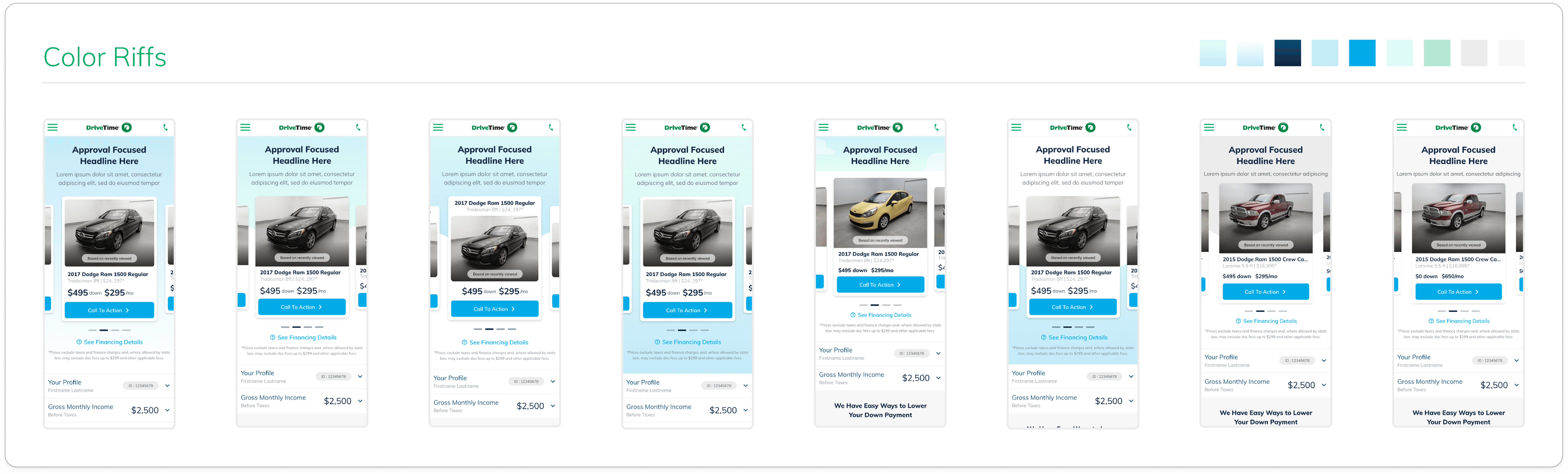
Color was a challenge

As I moved into high-fidelity, I ran into a key challenge: how to incorporate the new color palette without distracting from the primary content. The carousel was already a visually dense component and needed to remain the focal point. While the new gradient had become a strong part of the design system, applying it too heavily competed with the vehicle imagery. On the other hand, keeping the background neutral felt too plain and incomplete.

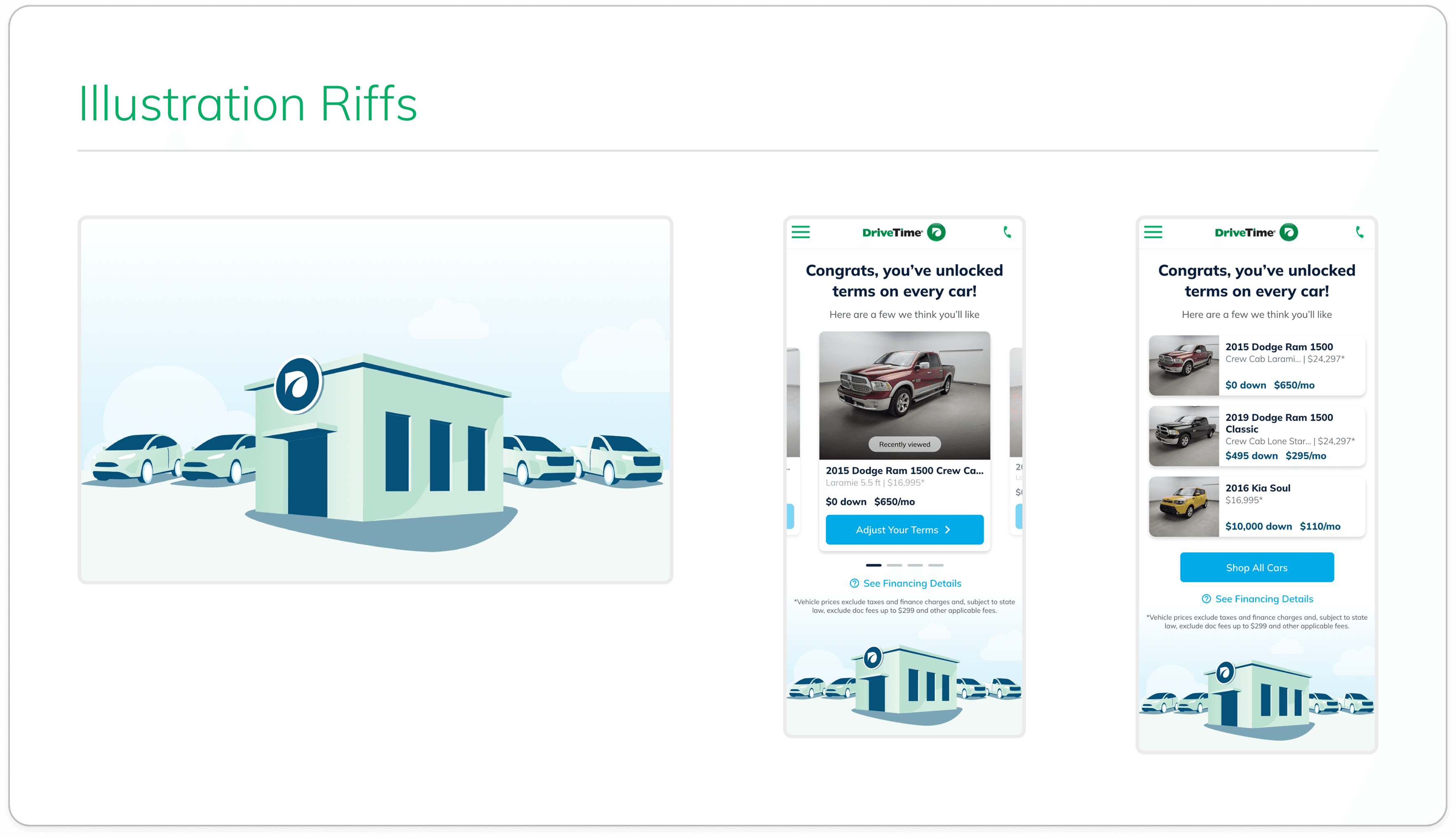
The Illustration Approach

After exploring options with the design team and revisiting the problem, I shifted to a different approach: incorporating an illustration below the carousel. This allowed the page to feel more engaging without competing with the primary content above the fold. It also aligned well with the GA1 and GA2 experiences, creating a more cohesive flow leading into App Cert.

The illustration was a collaborative effort with our graphic designer. We started with assets from Getty Images and customized them to fit the brand. Given that the goal of App Cert is to encourage vehicle shopping and drive users to the dealership, the final direction focused on dealership and inventory themes.

Chapter III

Refine

Hi-fidelity Designs & Prototype

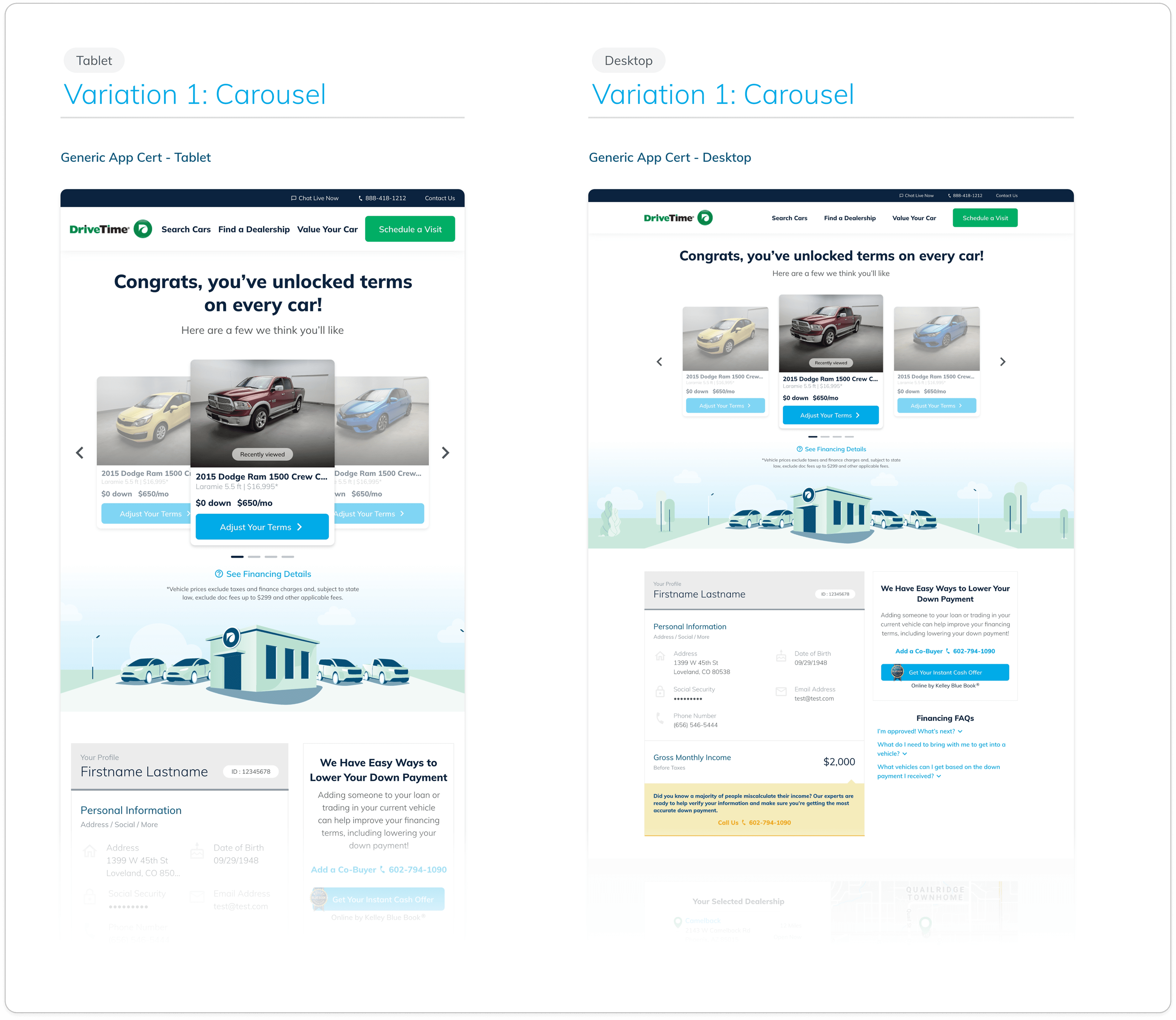
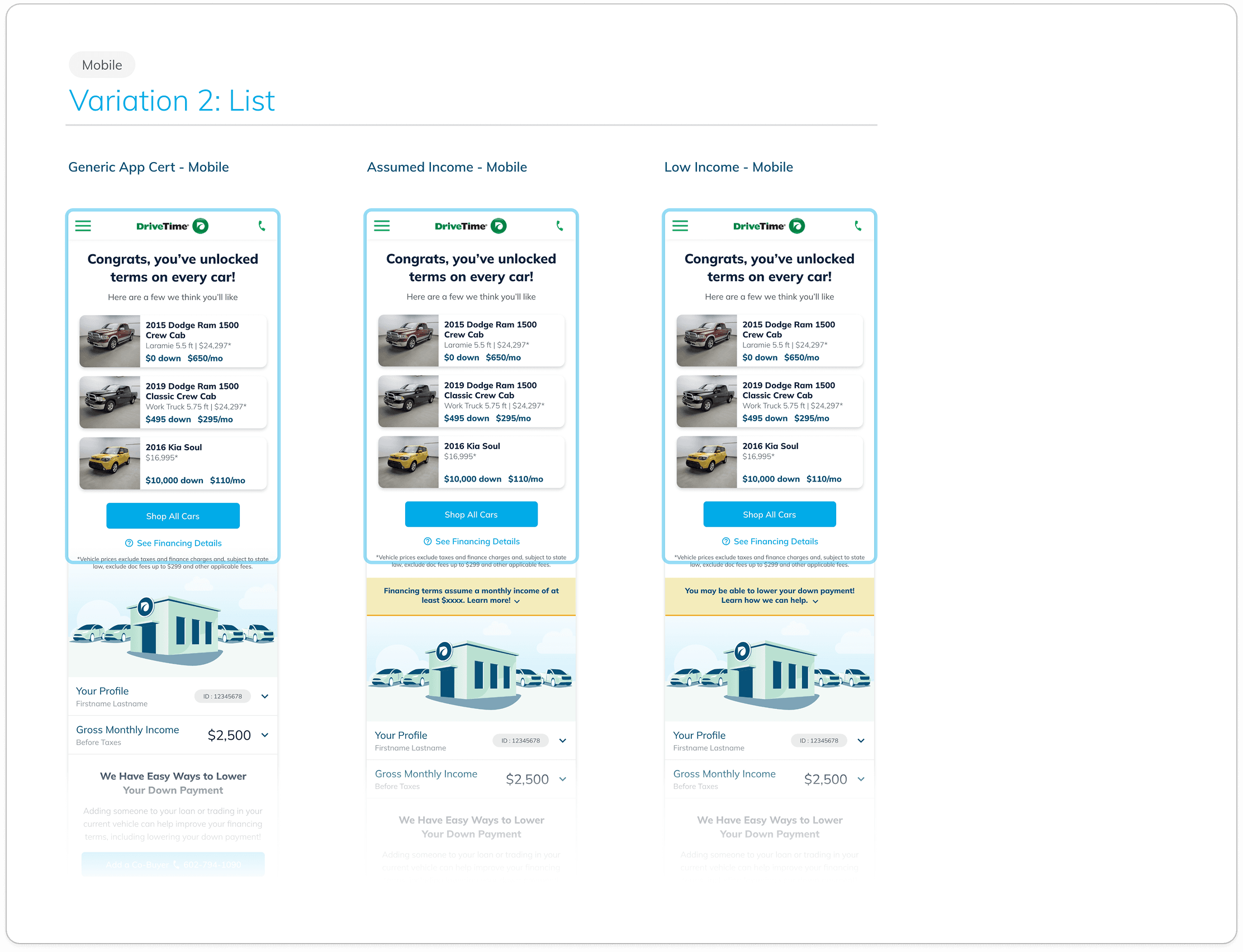
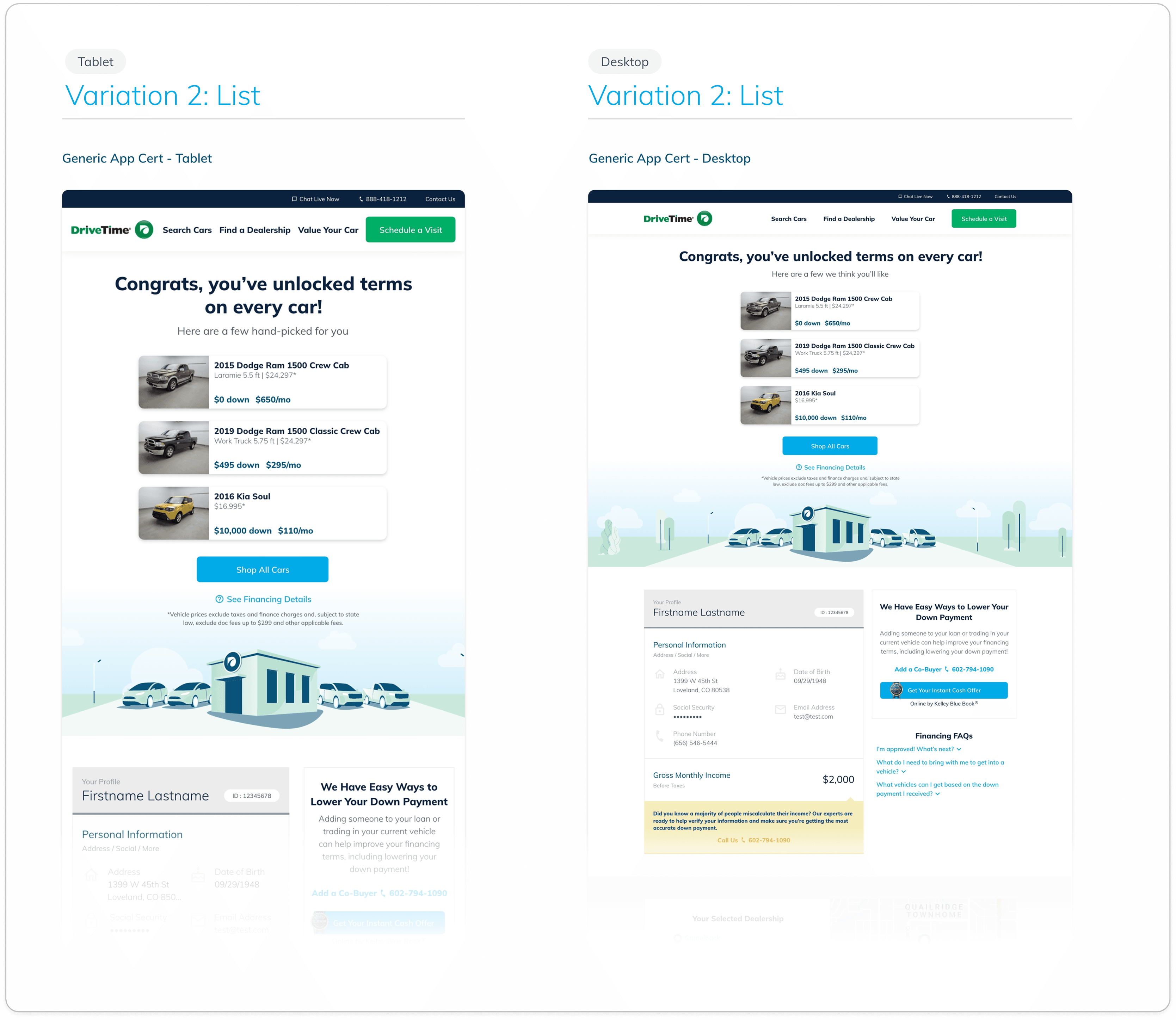
After approval from Product, Leadership, and Legal, I expanded the designs to tablet and desktop. The illustration translated well to larger screens, helping fill the space and balance the layout in a way the cards alone could not.

We finalized two variations for testing:

Variation 1 - Carousel: The user swipes through a car carousel with personalized terms on each card.
Variation 2 - List: The user views stacked vehicle cards with personalized terms on each card.

Before handoff, I validated spacing, ensured typography aligned with the design system, confirmed content accuracy, and accounted for key use cases. During this stage, we also defined vehicle logic — determining which vehicles should appear in the carousel and list views based on whether the user was a vehicle or finance shopper.

Once finalized, all designs and annotations were uploaded to Zeplin for development.

UAT Approvals

This project was my first time being heavily involved in UAT approvals. I learned the importance of thoroughly reviewing the experience before launch — checking functionality, animations, and any discrepancies between production and design.

This process ensured the final product aligned closely with the intended experience. 🚀

Chapter IV

Reflect

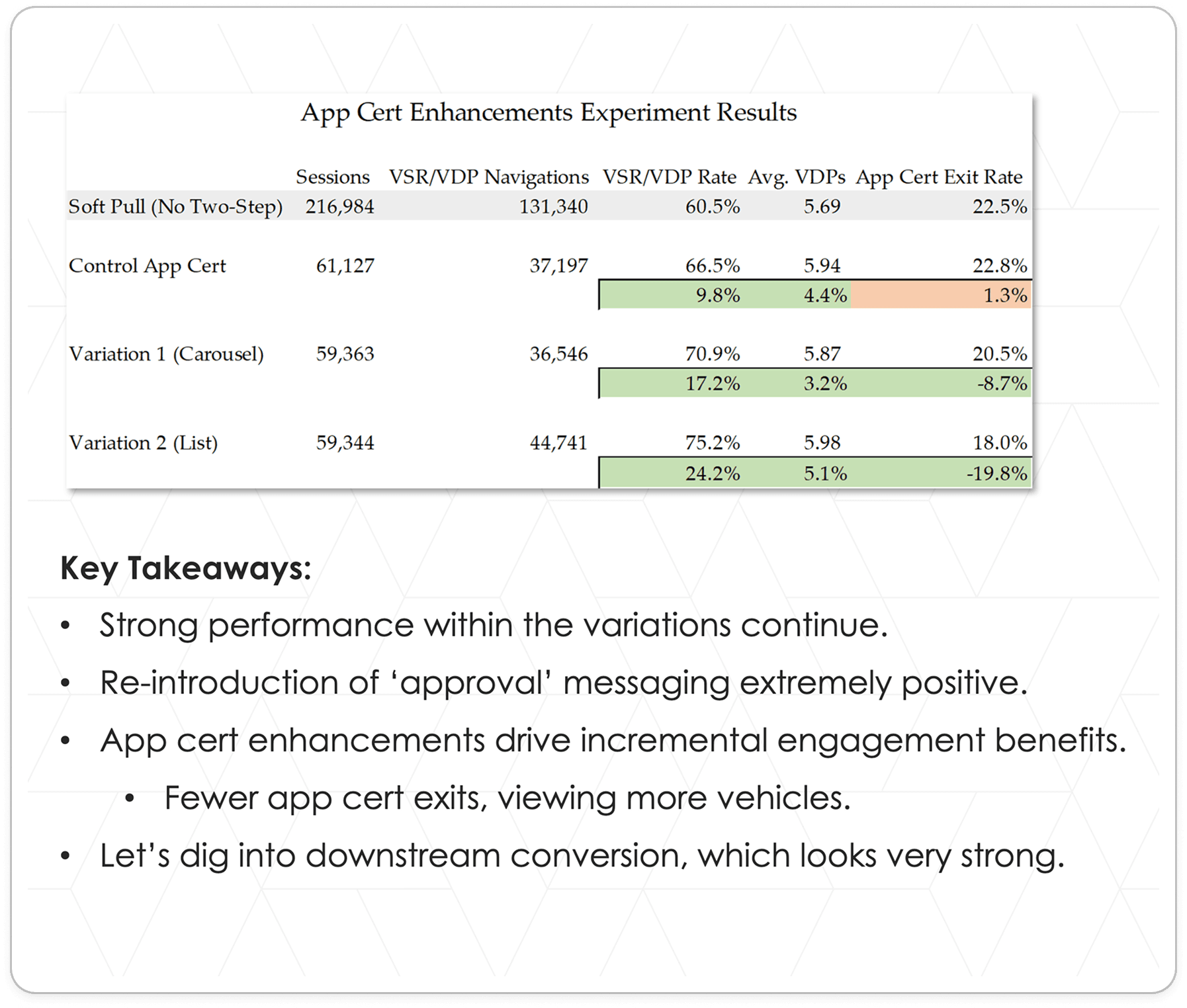
Experiment Results 🧪

About eight months into this experiment running, we turned off Control so that there was now 50/50 traffic to either List or Carousel. This was so we could gather more metrics to compare the two against one another without Control bucketing interfering with that data.


Adding a "Shop Cars" button

To access the button in the original view of Carousel, you’d need to rely on a user swiping through the entire carousel and tapping on the last card while in List it is always in view. Since List and Carousel had similar downstream results, we wanted to give Carousel a fair chance by making the “Shop Cars” CTA just as easily accessible as it was in the List view.

After replacing Carousel with this new view, the results between the two variations flattened out:
  • Final Carousel LTS: 2% (+17.6% from the last control numbers)

  • Final Carousel VSR/VDP view rate: 75.1% (+13.6% from the last control numbers)

  • Final Carousel App Cert exit rate: 17.5% (-21.1% from the last control numbers)

The business decision was that Carousel was the better experience and was officially declared the winner. 🎉

What I Learned
  1. Mobile-first design can be really efficient. A desktop-first approach was what I was more familiar with at the time, so having to go about this the other way around gave me an opportunity to approach my work a little differently (less to more as opposed to more to less).

  2. Small changes can have a big impact. This project taught me the value of being able to hyper-focus on a very specific thing rather than the page as a whole. Even though I wasn’t redesigning the entire page or website, it taught me how important just a small section can play in the UX and post-launch results of a product.

  3. Take necessary breaks when your initial ideas aren’t working. Sometimes I have difficulty with stepping away when experiencing those moments of frustration or doubt, but with this project I had to. Getting a good night’s rest and coming back to it the next day gave me a fresh perspective, and eventually I was able to create something that stuck.

  4. One mind can produce something good, but collaboration creates something great. This was one of the most collaborative projects I had been a part of in this season of my design career. It took brainstorming and sharing my in-progress work with my boss and colleagues to not get too stuck on one idea, getting together with our content specialist to find just the right copy, and working with our graphic designer to create an illustration that fit the vision. You can still take ownership of your work while picking the brains of others, and it’s a great reminder to not let one’s own ego hold you back.

©

2026

Elizabeth Ardelt